
How to view a student's progress in RootWright LMS
A student profile shows everything about one learner: the courses they are in, how far they have got, their grades and certificates, and their activity. Open it from RootWright LMS → Students by clicking the student's name.
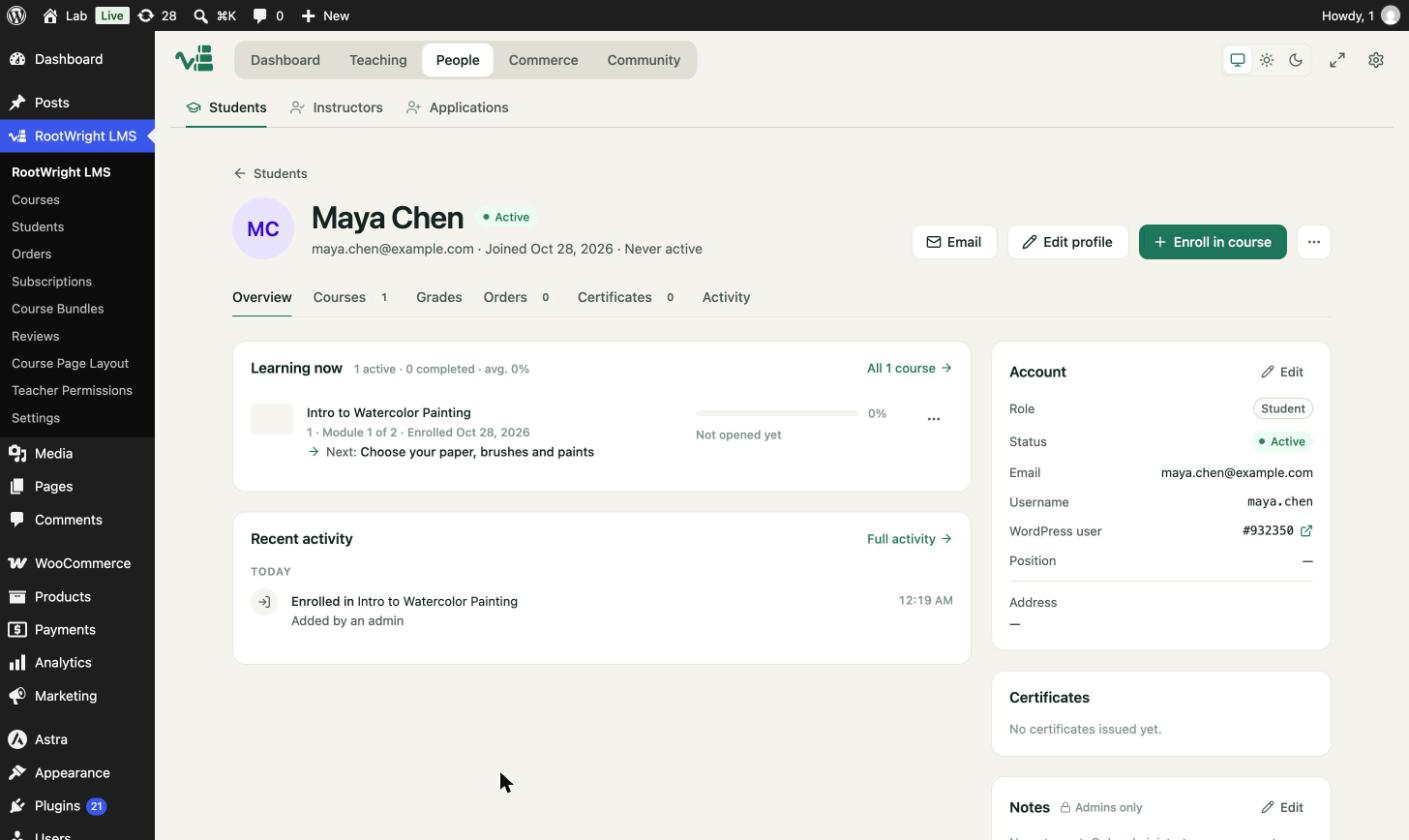
The profile overview. Learning now lists active courses with progress and the next lesson.
The profile header
- The student's name, status (Active), email, join date and when they were last active.
- Email to send them a message.
- Edit profile to change their details.
- Enroll in course to add them to a course.
- ⋯ for more actions.
The tabs
| Tab | Shows |
|---|---|
| Overview | Learning now, recent activity, account details and notes. |
| Courses | Every course the student is in. |
| Grades | Quiz and assignment results. |
| Orders | Purchases for this student. |
| Certificates | Certificates issued to the student. |
| Activity | The full activity log. |
Account details
The Account panel shows the student's Role, Status, Email, Username and linked WordPress user number. Use Edit to change them.
Notes
The Notes panel is visible to admins only. Use it to record support conversations or arrangements.