
How lesson completion works in RootWright LMS
Students mark a lesson complete with the Mark complete button at the top right of the lesson. The course progress counter in the course player shows how many lessons are complete.
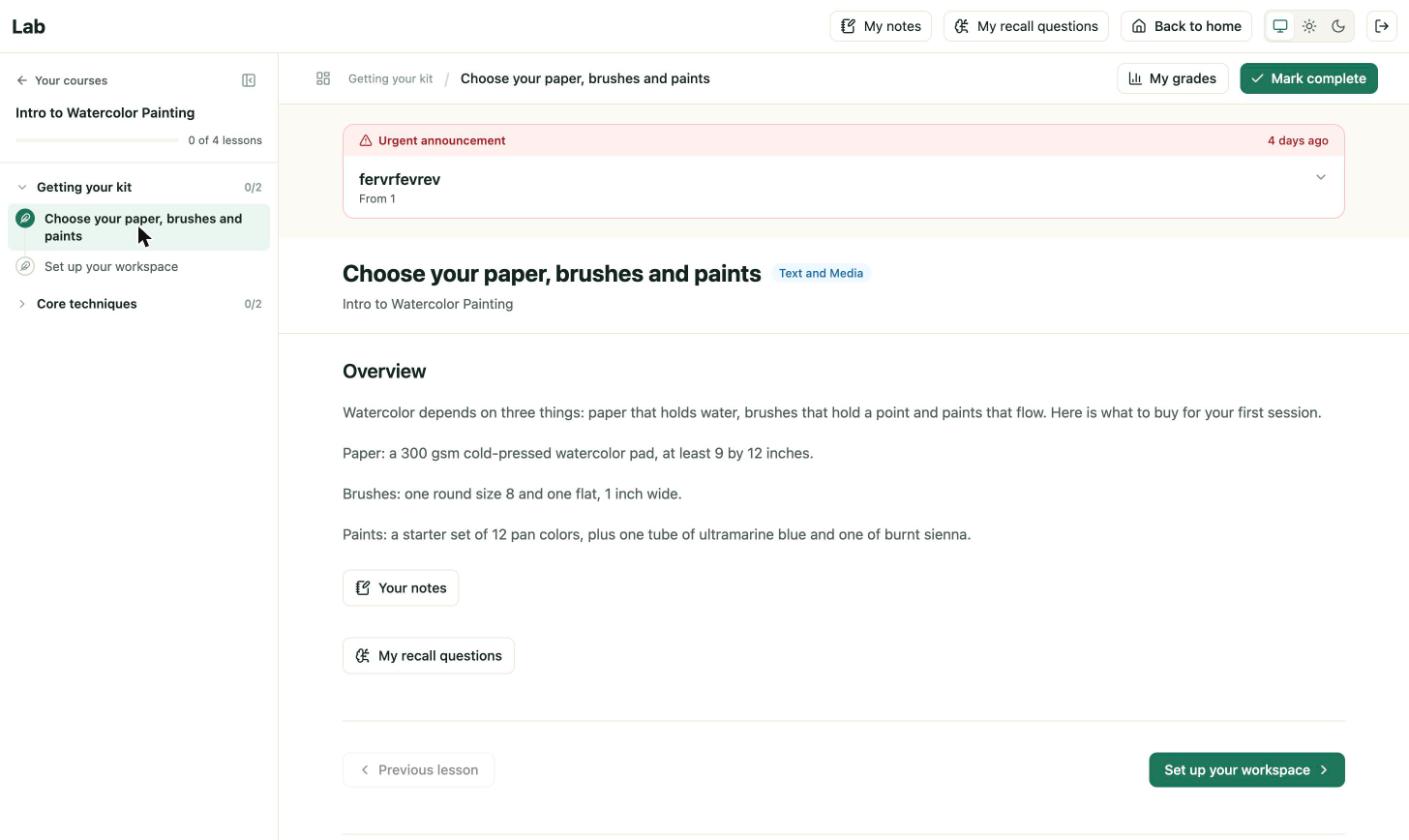
The lesson view in the student player. Mark complete sits next to My grades.
Open issue on the 1.0.0 build
On the lab test site, clicking Mark complete did not change the progress counter. It stayed at "0 of 4 lessons complete" after two lessons and a page reload. We are investigating. Until this is fixed, do not rely on completion to unlock content or issue certificates. See Troubleshooting.
What students see
- The lesson title and its type, such as Text and Media.
- Previous lesson and Next lesson buttons at the bottom.
- Your notes and My recall questions buttons under the content.
- My notes, My recall questions and Back to home in the top bar.
What completion controls
Completion drives the progress bar, the course "lessons complete" count and, when set, the course completion and certificate. Lessons marked Mandatory in the lesson builder must be complete before the course can finish.
Related
- Lessons for setting up completion in the lesson builder.
- What students see.