
How to use AI skills in RootWright LMS
An AI skill is a set of instructions you write once, such as a house style, a teaching method or a marking rubric. In RootWright LMS Pro you pick skills whenever the AI builds, extends or reviews a course. Manage them under Teaching → AI skills.
Pro
AI skills are part of RootWright LMS Pro and need an AI provider. See Connect your AI provider.
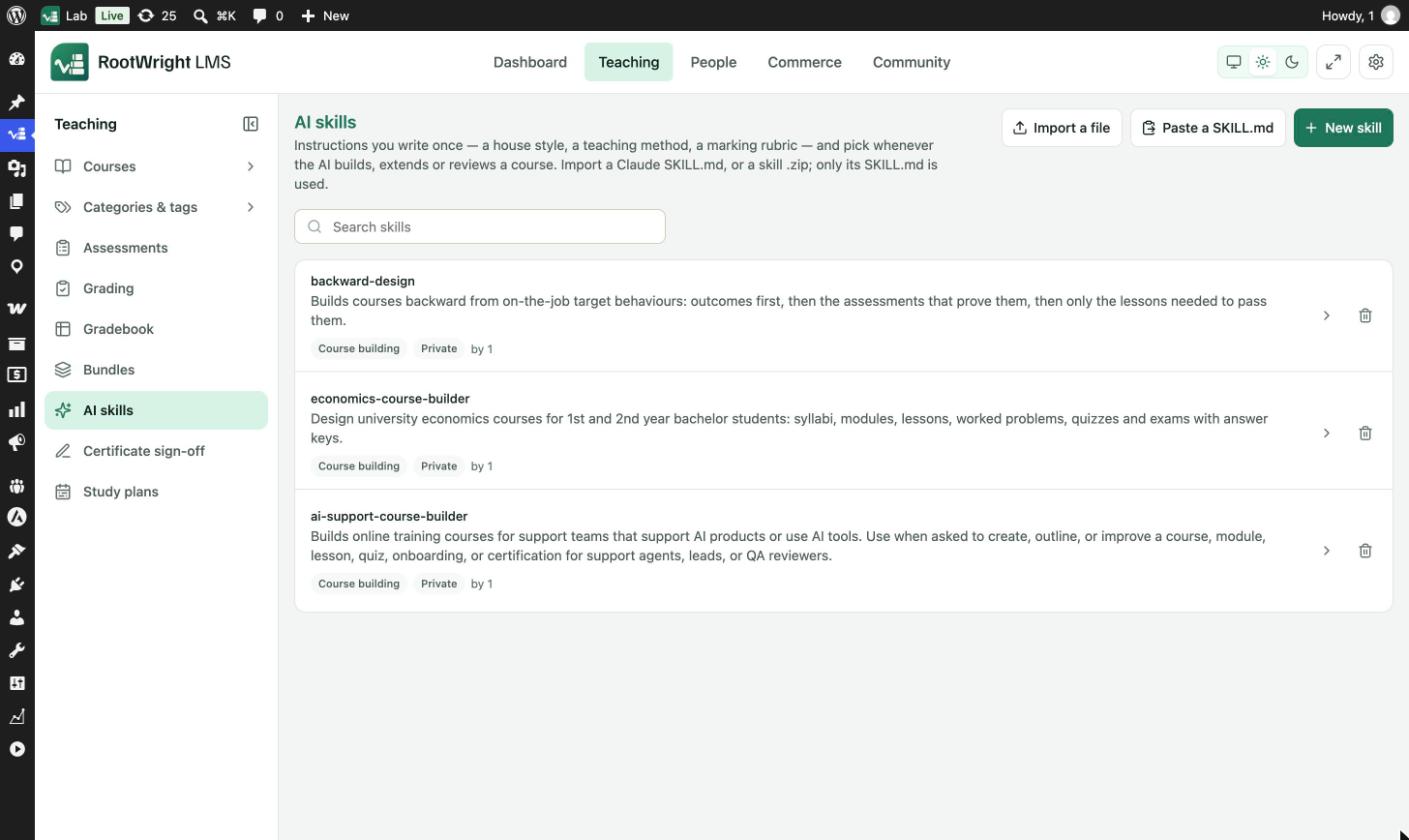
Teaching → AI skills. Each skill shows its description, its type, whether it is Private, and who wrote it.
Add a skill
Use one of the three buttons at the top of the screen:
- New skill writes a skill from scratch.
- Import a file uploads a Claude
SKILL.mdfile, or a skill.zip. Only theSKILL.mdinside a zip is used. - Paste a SKILL.md pastes the contents of a
SKILL.mdfile.
Manage skills
- Search skills filters the list.
- Click a skill, or the arrow on its row, to open it.
- The trash icon deletes a skill.
Use a skill
Pick skills in the Style section of Generate a course with AI, or in AI settings on a course's AI audit and AI chat tabs. Manage skills in those places opens this screen.