
Teacher permissions and roles in RootWright LMS
Teachers, called instructors in the admin, build and teach courses. Control how people become instructors, and what each instructor may do, under RootWright LMS → Teacher Permissions. The same screen is at Settings → People → Instructors & permissions.
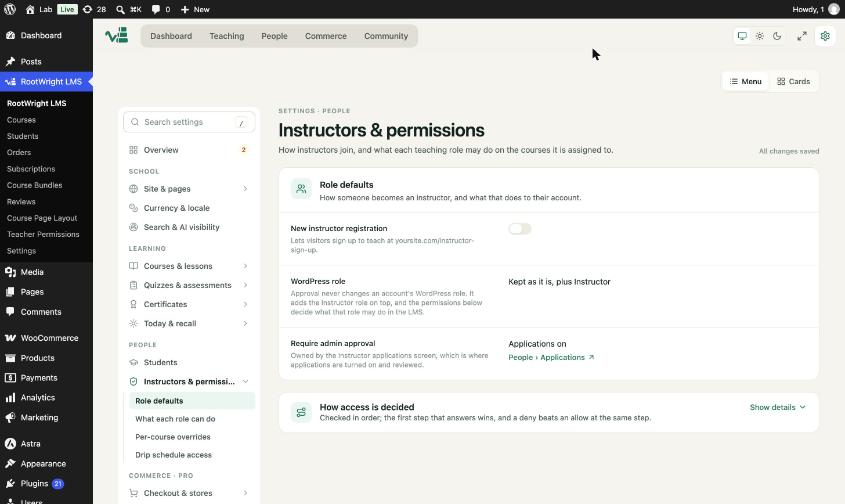
Role defaults: registration, WordPress role and admin approval.
Role defaults
- New instructor registration. Off by default. When on, visitors can sign up to teach at
yoursite.com/instructor-signup. - WordPress role. Shows Kept as it is, plus Instructor. Approval never changes an account's WordPress role. RootWright LMS adds the Instructor role on top.
- Require admin approval. Owned by the instructor applications screen, under People → Applications.
How access is decided
Access is checked in order. The first step that answers wins, and a deny beats an allow. Open Show details to see the steps.
Subsections
The Instructors & permissions area has four pages:
- Role defaults, described above.
- What each role can do, the permissions for each role.
- Per-course overrides, which grant or remove a permission on one course.
- Drip schedule access, which controls who can change drip schedules (Pro).
Instructor list
Go to People → Instructors to see every instructor, their active status, the number of courses and students, how many submissions they have to grade, and their rating. Use View profile to open one. Message opens a message to them.
Related
- Course settings and access for per-course instructors.
- Connect your AI provider.