
How to install RootWright LMS Pro
RootWright LMS Pro is an add-on. Install and activate RootWright LMS Free first, then upload the Pro zip. Pro will not activate without the Free plugin.
Pro
Pro needs a license before its features work on a live site. See Activate your Pro license.
Install Pro
- Make sure RootWright LMS (Free) is installed and active.
- Go to Plugins → Add Plugin → Upload Plugin.
- Choose
rootwright-lms-pro.zipand click Install Now. - Click Activate Plugin.
The Plugins screen lists RootWright LMS Pro version 1.0.0 with the note "Requires: RootWright LMS". If you deactivate Free while Pro is active, WordPress refuses, because Pro depends on Free.
What changes after Pro is active
- The RootWright LMS sidebar gains Subscriptions and Course Bundles.
- The course editor shows the Pro sections: Drip schedule, Gradebook, Grading, Q&A, CRM, Mock exams, Retention, AI audit and AI chat.
- Settings gains the Commerce, Integrations and related Pro panels.
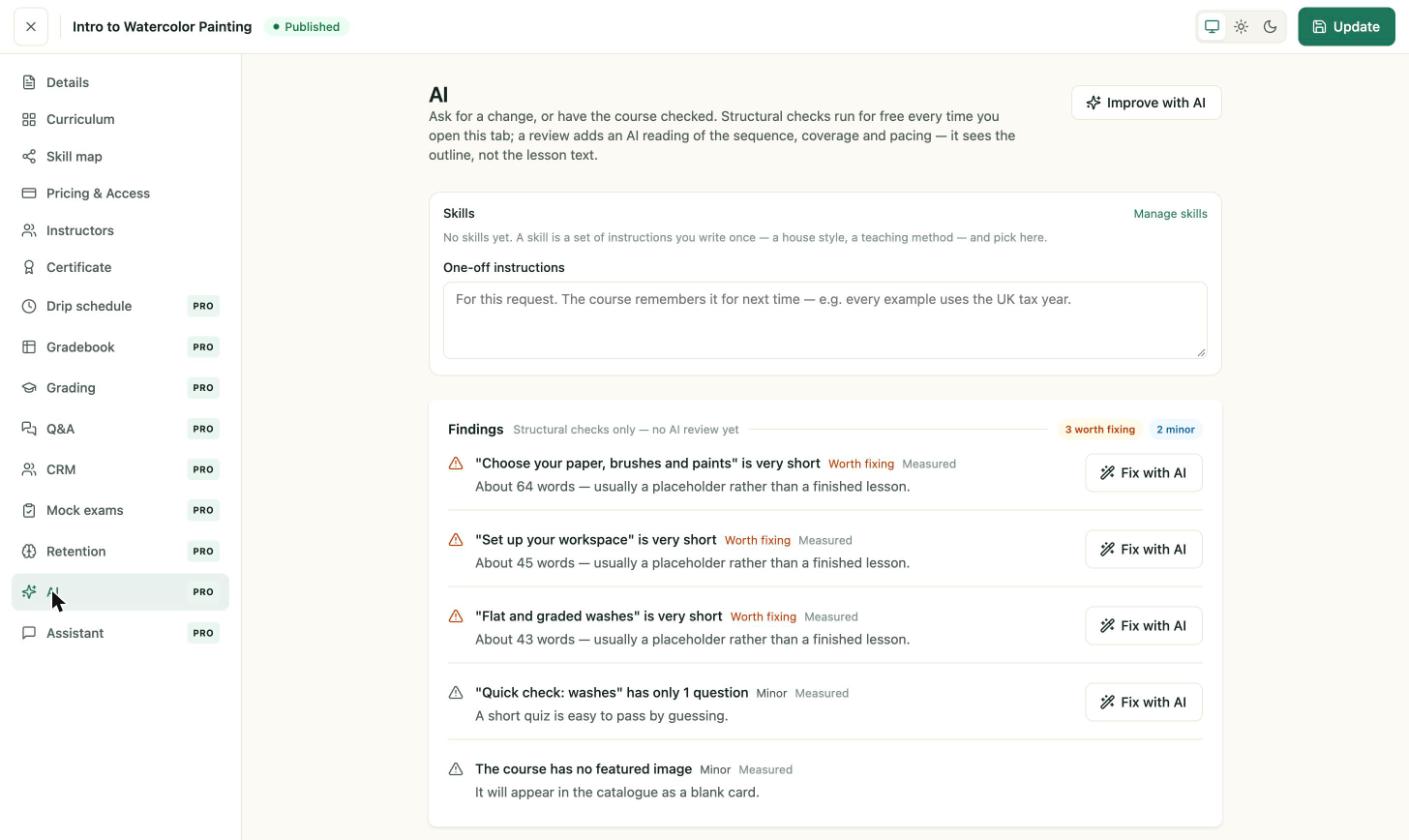
The course editor with Pro sections. Each one is tagged PRO in the menu.
Next steps
- Free and Pro together explains each install state.
- Set up payments to sell courses.